
Part 1: Your Journey: 0 to 30 WPM
Week 5 — Lesson 1 | CI1000: Computer Basics for Healthcare Professionals
Learning Objectives
By the end of this lesson you will be able to:
- Demonstrate typing at 30 WPM with 90% accuracy, meeting the minimum professional benchmark.
- Evaluate your five-week keyboarding journey, analyzing improvement trends and identifying areas for continued growth.
- Explain how continued typing practice beyond 30 WPM supports career advancement in healthcare roles.
Part 1: Your Journey: 0 to 30 WPM
Five weeks ago, you placed your fingers on the home row for the first time and began building a skill that will serve you throughout your healthcare career. Whether you started as a complete beginner or had some previous experience, the progress you have made is worth celebrating. Reaching 30 words per minute with 90% accuracy is a meaningful accomplishment, and this lesson will help you understand exactly what that milestone means in the professional world.
Think about how far you have come. In Week 1, you learned the home row keys and began developing muscle memory. By Week 2, you were typing at 10 WPM as your fingers started finding keys without looking down. Week 3 brought you to 17 WPM as you added more keys and built confidence. In Week 4, you reached 23 WPM and started typing short sentences with greater fluency. Now, in Week 5, you are targeting 30 WPM, which translates to roughly 150 characters per minute.
What 30 WPM Looks Like in Practice
At 30 words per minute, you can type a short paragraph of about three sentences in one minute. That may sound modest, but consider this: a standard email of 100 words takes you just over three minutes to type. A one-page memo of approximately 250 words takes about eight minutes. In a healthcare office, this speed allows you to keep up with many routine documentation tasks without causing bottlenecks in your workflow.
Key Takeaway: Your five-week journey from 0 to 30 WPM demonstrates that consistent, structured practice produces measurable results. This same principle applies to every technical skill you will learn in your healthcare career.
Part 2: The 30 WPM Professional Benchmark
Why does 30 WPM matter? In healthcare administration and many entry-level office positions, 30 WPM is commonly cited as the minimum acceptable typing speed. Employers list this figure in job postings for roles such as medical receptionist, patient registration clerk, and administrative assistant. Meeting this benchmark signals to employers that you can handle routine typing tasks efficiently.
Where 30 WPM Fits on the Professional Scale
According to Wonderlic's profession-specific benchmarks, typing speed expectations vary significantly by role. Understanding where 30 WPM falls on this scale gives you valuable perspective on your progress and future goals.
| Profession | Typical WPM Requirement | Context |
|---|---|---|
| General office worker | 30 to 40 WPM | Emails, memos, basic data entry |
| Medical receptionist | 35 to 45 WPM | Patient intake forms, appointment scheduling |
| Data entry clerk | 45 to 60 WPM | High-volume records processing |
| Medical transcriptionist | 60 to 80 WPM | Transcribing physician dictation in real time |
| Medical scribe | 60 to 90+ WPM | Documenting patient visits during clinical encounters |
As you can see, 30 WPM is your entry point into the professional world. It opens the door to office and administrative positions, and every additional word per minute you gain expands the range of roles available to you.
Healthcare Connection: Research published in the Journal of Medical Internet Research (PMC/NIH) found that healthcare workers who type faster spend less time on documentation and more time interacting with patients. In medical scribing, where professionals type during live clinical encounters, speeds of 60 to 80 WPM are standard. Your 30 WPM foundation is the starting point for reaching those advanced levels.
Knowledge Check
Part 3: Healthcare Typing in Practice
Now that you understand where 30 WPM fits on the professional scale, let us look at how typing speed plays out in real healthcare tasks. Every minute you save through efficient typing is a minute you can spend on patient care, communication with your team, or learning new skills.
Real-World Healthcare Typing Scenarios
EHR Data Entry During Patient Intake
When a patient arrives for an appointment, you may need to enter their demographic information, insurance details, and reason for the visit into an electronic health record (EHR) system. A typical intake entry runs about 80 to 100 words. At 30 WPM, you can complete this entry in roughly three minutes. At 45 WPM, the same entry takes about two minutes, freeing an extra minute per patient.
Medical Coding Documentation
Medical coders review clinical documentation and assign diagnostic and procedure codes. While much of the work involves reading and selecting from code lists, coders also type justification notes, query responses, and correspondence. At 30 WPM, you can handle these narrative portions efficiently, and improving beyond 30 WPM allows you to process more records per shift.
Appointment Scheduling Notes
When scheduling appointments, you often need to type brief notes about the reason for the visit, special instructions, or referral information. These notes are typically 20 to 40 words. At 30 WPM, you can type a scheduling note in under a minute, which keeps the workflow moving smoothly at a busy front desk.
Prescription Processing
Healthcare support staff frequently enter prescription information into pharmacy systems, including medication names, dosages, and patient instructions. Speed and accuracy are equally important here. A typing error in a prescription can have serious consequences, which is why the 90% accuracy target is just as important as the 30 WPM speed goal.
Pro Tip: Accuracy always comes before speed. In healthcare settings, a typing error in a patient's medical record, prescription, or insurance claim can lead to delayed treatment, billing problems, or even patient safety issues. Focus on maintaining at least 90% accuracy as you work toward higher WPM goals.
Protect Your Body: Ergonomic Workstation Setup
As you type more throughout your healthcare career, proper workstation ergonomics become essential for preventing repetitive strain injuries and maintaining long-term productivity. The diagram below shows the key elements of an ergonomic setup, from monitor height and chair positioning to keyboard and mouse placement.
Click the card to flip it
Part 4: Beyond the Course: Continued Growth
Reaching 30 WPM is your foundation, not your ceiling. The best time to build on this momentum is right now, while your practice habits are still fresh. Setting post-course goals will help you continue improving and open doors to more advanced healthcare roles.
Setting Your Next WPM Goals
Consider the following progression as a guide for your continued development:
- 35 WPM -- Comfortable speed for general office tasks such as emails and short memos. Most entry-level healthcare administrative roles require this level.
- 40 WPM -- Efficient speed for sustained data entry. You can handle patient registration and billing tasks with ease at this level.
- 50 WPM -- Strong professional speed. At this level, you are competitive for medical records and health information technician positions.
- 60+ WPM -- Advanced speed that opens the door to medical transcription, medical scribing, and other documentation-intensive roles.
Continued Practice with SAM
Your SAM (Skills Assessment Manager) from Cengage keyboarding activities remain available throughout the term. Continue using SAM for structured practice, timed assessments, and progress tracking. Launch SAM from the activity links in your D2L Brightspace course modules to keep building your speed beyond 30 WPM.
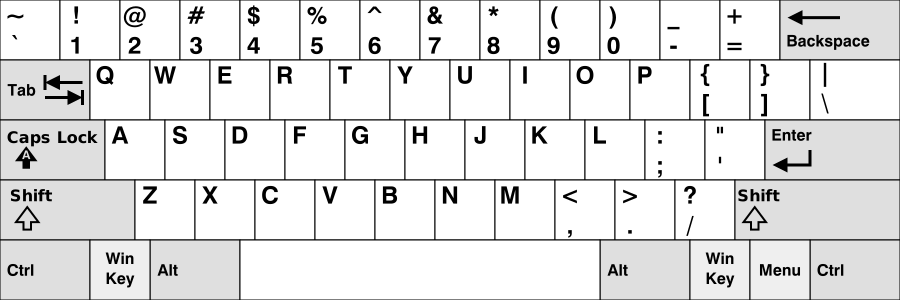
As you continue practicing, keep this standard QWERTY keyboard layout handy as a quick reference. Familiarity with the full layout helps you build speed on keys outside the home row, including numbers, symbols, and punctuation that appear frequently in healthcare documentation.
In this video, Ali Abdaal, a doctor who reached 156 WPM, shares his approach to improving typing speed. His experience demonstrates that there is no upper limit to what you can achieve with consistent practice, and his medical background makes his perspective especially relevant to your healthcare career path.
Five-Minute Final Typing Test
This is your final typing test. The passage below covers clinical documentation, including medical abbreviations and patient safety concepts. Show how far you have come since Week 1.
Test Complete!
Course Milestone: Compare your results to your Week 1 baseline. If you have been practicing 15 to 20 minutes every day, you should see a significant improvement in both speed and accuracy. Meeting the 30 WPM target means you are ready for the typing demands of an entry-level healthcare administrative role. Keep practicing after this course ends to continue building your speed.
Knowledge Check
Lesson 5.1 Summary
- Over five weeks, you progressed from the home row to 30 WPM with 90% accuracy, which is the minimum professional benchmark for most healthcare administrative roles.
- At 30 WPM (150 characters per minute), you can type a standard email in about three minutes and a one-page memo in roughly eight minutes.
- Healthcare typing tasks include EHR data entry, medical coding documentation, appointment scheduling notes, and prescription processing.
- The professional scale ranges from 30 WPM (entry-level office work) to 60-plus WPM (medical scribing), and every increase opens new career opportunities.
- Accuracy is just as important as speed in healthcare settings, where typing errors can affect patient safety and billing accuracy.
- SAM Cengage keyboarding activities provide structured practice for continued improvement. Access SAM through your D2L Brightspace course.