
Part 1: Your Progress So Far
Week 4 — Lesson 1 | CI1000: Computer Basics for Healthcare Professionals
Learning Objectives
By the end of this lesson you will be able to:
- Apply touch-typing technique to achieve at least 23 WPM with 80% accuracy.
- Analyze personal typing patterns to identify specific keys, letter combinations, or habits that reduce speed or accuracy.
- Explain the employer typing requirements for common healthcare data entry roles.
Part 1: Your Progress So Far
Take a moment to recognize how far you have come. In Week 1, you began with a target of 10 words per minute. By Week 2, you were working toward 14 WPM, and Week 3 pushed you to 17 WPM. Now, in Week 4, your goal is 23 words per minute with at least 80% accuracy. That represents more than doubling your speed in just four weeks.
Consider what that improvement means in practical terms. At 10 WPM, typing a 200-word email would take 20 minutes of keyboard time alone. At 23 WPM, that same email takes under nine minutes. In a busy medical office, where staff members send dozens of emails, enter patient data, and draft documents throughout the day, that time savings adds up quickly.
Your Keyboarding Journey
Week 1
10 WPM target
Week 2
14 WPM target
Week 3
17 WPM target
Week 4
23 WPM target
Week 1: Foundation
Baseline assessment, home row introduction, 10 WPM target
Week 2: Building Speed
10 WPM with 70% accuracy, muscle memory fundamentals
Week 3: Ergonomics & Speed
17 WPM with 75% accuracy, workstation ergonomics, RSI prevention
Week 4: Healthcare Standards
23 WPM with 80% accuracy — error pattern analysis, healthcare benchmarks
Week 5: Professional Mastery
30 WPM with 90% accuracy — professional typing benchmark
Your fingers are building what researchers call procedural memory. Each week, the motions required to type common letter combinations become more automatic. You think less about where each key is and more about what you want to say. This shift from conscious effort to automatic movement is the foundation of typing fluency, and it only develops through consistent practice.
Pro Tip: If your current speed feels slower than you expected, do not worry. Speed gains in keyboarding are not always linear. Many students experience a brief plateau around 15 to 20 WPM before a noticeable jump. The key is to keep practicing consistently rather than skipping sessions.
Part 2: Healthcare Typing Requirements
Understanding what employers expect is an important part of setting your personal goals. Typing speed requirements vary across healthcare roles, but they are almost always listed as a minimum qualification in job postings. Knowing these benchmarks helps you see where your current 23 WPM fits on the path toward employment.
Typing Benchmarks by Healthcare Role
| Role | Minimum WPM | Preferred WPM | Context |
|---|---|---|---|
| Front Desk / Receptionist | 25 to 35 | 40+ | Scheduling, patient check-in, phone notes |
| Healthcare Data Entry | 35 to 50 | 60+ | Insurance claims, billing codes, patient records |
| Medical Billing Specialist | 35 to 45 | 50+ | Coding entries, claim submissions, correspondence |
| Medical Transcriptionist | 50 to 60 | 80+ | Dictation transcription, clinical notes |
| Medical Scribe | 60 to 80 | 90+ | Real-time documentation during patient visits |
According to Wonderlic, healthcare data entry positions typically require 50 to 70 or more words per minute. HealthChannels, a major medical scribing employer, notes that medical scribes often need 60 to 80 WPM and sometimes 90 or more to keep pace with physician dictation during patient encounters.
At 23 WPM, you are approaching the lower range for entry-level front desk and receptionist positions. That is meaningful progress. Your goal over the remaining weeks of this course is to continue building toward the 30 WPM target and beyond, moving closer to the requirements for data entry and billing roles.
Healthcare Connection: In a medical scribing role, the provider speaks and the scribe types in real time. If the provider speaks at roughly 150 words per minute during a patient visit, a scribe typing at 60 WPM captures about 40% of the content verbatim and uses abbreviations and shorthand for the rest. Speed and accuracy are equally important because errors in clinical documentation can affect patient care decisions.
Part 3: Troubleshooting Common Patterns
By Week 4, most students have developed enough experience to notice patterns in their mistakes. Identifying your specific error patterns is the first step toward correcting them. Rather than practicing everything equally, targeted practice on your weak areas produces faster improvement.
Common Error Categories
Hand Imbalance Errors
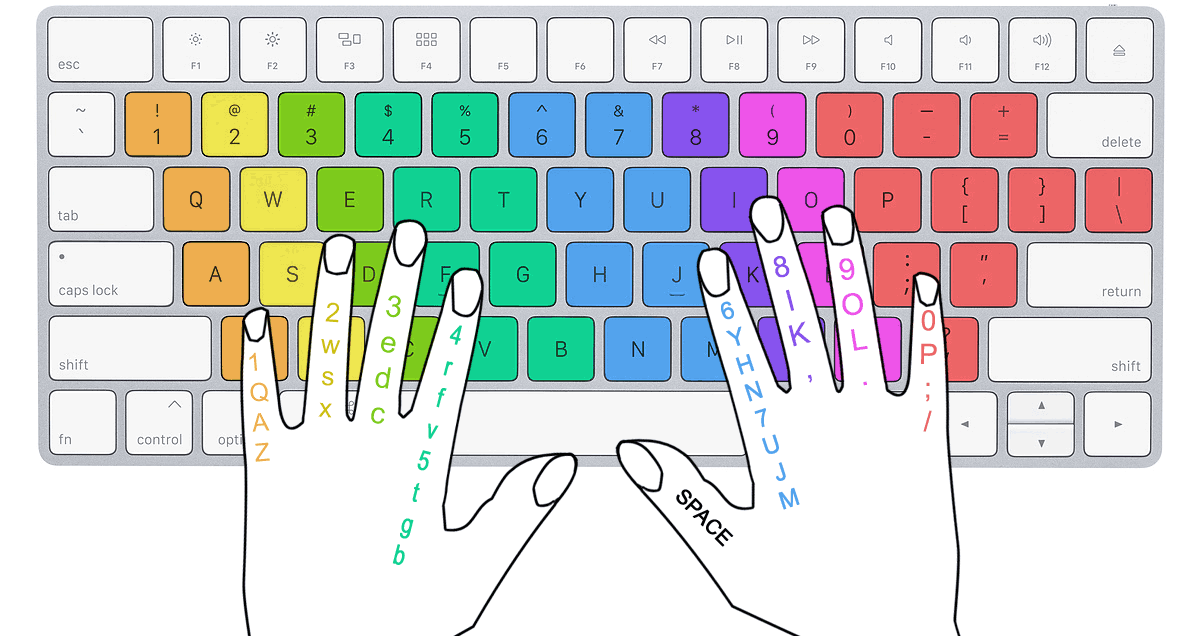
Many new typists find that one hand is stronger or more accurate than the other. If you are right-handed, you may notice more errors on keys controlled by the left hand (such as Q, W, E, A, S, and D) and vice versa. To check for this pattern, review your recent typing test results and note which side of the keyboard produces more mistakes.
Targeted fix: Practice left-hand-only or right-hand-only drills in your SAM Cengage keyboarding activities. Spend five minutes per session focusing on your weaker hand before moving to full-keyboard exercises.
Number Row and Punctuation Errors
The number row sits above the home row and requires a longer reach. Numbers are especially important in healthcare because you will type patient ages, medication dosages, appointment times, and billing codes regularly. Common trouble spots include confusing 6 and 7 (both reached by the index fingers) and mistyping symbols that require the Shift key, such as parentheses or the dollar sign.
Targeted fix: Use number-specific drills that mix digits with words. For example, practice typing medical data entries, such as the following: "Patient DOB: 03/15/1987, Weight: 165 lbs, BP: 120/80."
Transposition and Adjacent-Key Errors
Transposition errors occur when you type letters in the wrong order, such as typing "teh" instead of "the" or "adn" instead of "and." Adjacent-key errors happen when a finger lands on the neighboring key, such as typing "f" instead of "g." Both types often increase as you try to type faster before your accuracy is solid.
Targeted fix: Slow down by five WPM for one practice session and focus entirely on accuracy. Once you can complete a passage with fewer than three errors per minute, gradually increase your speed. Accuracy first, speed second.
Self-Assessment: Identify Your Weak Keys
Open your SAM Cengage keyboarding activity in D2L Brightspace and complete one timed typing test. After the test, review the results screen and answer the following questions:
- Which three keys produced the most errors?
- Were your errors concentrated on one hand or evenly distributed?
- Did you make more errors in the first half or the second half of the test? (Fatigue-related errors increase toward the end.)
Write down your answers. Knowing your specific weaknesses lets you choose practice drills that address those areas directly, rather than repeating exercises that reinforce skills you have already mastered.
Knowledge Check
Part 4: Speed-Building Strategies
Building typing speed is not about moving your fingers as fast as possible. Effective speed building combines rhythm, smart practice habits, and content that mirrors the text you will actually type on the job. The strategies below are used by professional typists and can help you push past the 23 WPM mark efficiently.
Rhythm Typing vs. Burst Typing
There are two approaches to fast typing. Rhythm typing means maintaining a steady, consistent pace throughout a passage. Burst typing means typing common words and phrases very quickly, then pausing briefly before the next burst. Most professional typists use a combination of both.
For beginners, rhythm typing is the better starting strategy. Focus on keeping a steady pace rather than sprinting through easy words and stumbling on difficult ones. A consistent 23 WPM with high accuracy is more productive than alternating between 30 WPM and 10 WPM within the same passage.
Phrase Practice
Instead of typing individual words, practice typing common two-word and three-word phrases. Your brain and fingers learn to treat frequently used combinations as single units. In healthcare documentation, the following phrases appear often:
- "the patient"
- "follow up"
- "as needed"
- "vital signs"
- "blood pressure"
- "date of birth"
- "chief complaint"
- "medical history"
Practicing these phrases until they feel automatic will increase your effective speed when typing real healthcare documents.
Timed Practice with Healthcare Content
Generic typing exercises are useful, but practicing with content similar to what you will type in a healthcare role is even better. Try typing the following sample medical note at a steady pace, focusing on accuracy first:
Try It Now: Open a blank Word document and type the following passage. Time yourself and calculate your WPM:
"Patient presents with a two-day history of sore throat and low-grade fever. Vital signs are within normal limits. No known drug allergies. The provider recommends rest, fluids, and a follow-up visit in three days if symptoms do not improve."
Building a Daily Practice Routine
Consistency matters more than session length. Research on skill acquisition shows that short, frequent practice sessions produce better results than long, infrequent ones. Consider the following schedule:
| Time | Activity | Purpose |
|---|---|---|
| Two minutes | Warm-up drill (home row keys) | Activate muscle memory |
| Three minutes | Weak-key targeted drill | Address specific error patterns |
| Five minutes | Timed paragraph (healthcare content) | Build speed and endurance |
| Two minutes | Cool-down: phrase practice | Reinforce common word combinations |
This 12-minute routine, done once or twice each day, is enough to produce steady improvement. Use your SAM Cengage keyboarding activities in D2L Brightspace for structured practice, or use the typing test on this page.
Key Takeaway: Speed follows accuracy. If you focus on reducing errors first, your speed will increase naturally as your fingers spend less time correcting mistakes. Set a weekly goal of reducing your error rate by one to two percentage points, and your WPM will climb steadily.
Five-Minute Typing Test
Put your skills to the test. The passage below covers medical billing terminology, including CPT and ICD codes. These are the kinds of entries you will type daily in a healthcare billing role.
Test Complete!
Numbers and Codes: Notice how this passage includes numbers and special characters such as periods and codes like 99214 and J02.0. Healthcare typing often requires switching between letters, numbers, and symbols. Practice reaching for the number row without looking down. Your right index finger handles 6 and 7, your right middle finger handles 8, and so on.

Knowledge Check
Lesson 4.1 Summary
- You have progressed from 10 WPM in Week 1 to a target of 23 WPM in Week 4, more than doubling your speed through consistent practice.
- Healthcare employer requirements range from 25 to 35 WPM for front desk roles to 60 to 90 WPM for medical scribes.
- Identifying your specific error patterns (hand imbalance, number row, transpositions) allows you to target practice where it matters most.
- Rhythm typing with a focus on accuracy produces better long-term speed gains than rushing through exercises.
- A 12-minute daily practice routine using healthcare-themed content builds both speed and job-relevant fluency.