Part 1: Digital Citizenship and Netiquette
Week 3 — Lesson 2 | CI1000: Computer Basics for Healthcare Professionals
Learning Objectives
By the end of this lesson you will be able to:
- Describe the principles of netiquette and explain why professional online communication matters in healthcare.
- Identify common cybersecurity threats including phishing, malware, and social engineering.
- Apply best practices for creating strong passwords and protecting personal information online.
- Explain how HIPAA regulations affect the way healthcare workers handle digital patient information.
Part 1: Digital Citizenship and Netiquette
Every time you send an email, post a comment, or share a file online, you are participating in a digital community. Digital citizenship is the practice of using technology responsibly, ethically, and respectfully. For healthcare professionals, this extends beyond personal communication to every interaction that involves patients, colleagues, and protected health information.
Netiquette (a combination of "internet" and "etiquette") refers to the accepted rules of polite behavior in online communication. While these guidelines apply to everyone, they carry extra weight in healthcare because a poorly worded email or a careless social media post can violate patient privacy, damage professional relationships, or even result in legal consequences.
Core Principles of Netiquette
- Be professional in tone. Online communication lacks the body language and vocal cues that help convey meaning in person. Write clearly, avoid sarcasm, and use complete sentences. If an email could be misread, rewrite it before sending.
- Use proper grammar and spelling. A message filled with errors can undermine your credibility. In healthcare, accuracy in written communication is not just courteous. It is essential.
- Think before you post. Anything you publish online can be permanent. Before sharing content on social media, ask yourself: Would I be comfortable if my supervisor, a patient, or a licensing board saw this?
- Respect others' time. Keep emails concise and use clear subject lines. If a message requires action, state what you need and by when. In a busy medical office, no one has time to read through a lengthy email to find the request buried in paragraph four.
- Do not type in all capital letters. Text written in all caps is interpreted as shouting. Use normal capitalization, and reserve bold text for key terms or action items.
Pro Tip: Before sending any professional email, read it aloud. If it sounds harsh, vague, or could be misunderstood, revise it. A two-minute review can prevent a misunderstanding that takes hours to resolve.
Part 2: Intellectual Property and Copyright
In both your academic work and your future healthcare career, you will regularly use information created by others, including research articles, images, instructional materials, and data. Understanding intellectual property (IP) and copyright protects you from legal trouble and ensures you give proper credit to the people whose work you use.
What Is Intellectual Property?
Intellectual property refers to creations of the mind that are protected by law. Copyright specifically protects original works of authorship, including the following:
- Written text such as articles, books, and research papers
- Images, photographs, and illustrations
- Music and audio recordings
- Software and computer code
- Videos and multimedia content
Copyright protection is automatic. The moment someone creates an original work and records it in a tangible form, it is copyrighted. You do not need to see a copyright symbol to assume a work is protected.
Fair Use and Creative Commons
Fair use allows limited use of copyrighted material without permission for purposes such as education, criticism, and research. However, fair use has limits. Copying an entire article and submitting it as your own work is not fair use. It is plagiarism.
Creative Commons licenses allow creators to share their work with specific permissions. Some licenses allow free reuse with attribution, while others restrict commercial use or modifications. When searching for images or resources for school projects, look for Creative Commons-licensed content to stay on the right side of the law.
Plagiarism in Academic and Professional Contexts
Plagiarism is presenting someone else's work, ideas, or words as your own without proper attribution. In your academic career at UMA, plagiarism can result in a failing grade or disciplinary action. In a professional healthcare setting, plagiarism in published research or clinical documentation can lead to job loss and damage to your professional reputation.
To avoid plagiarism, follow these practices:
- Always cite your sources when using someone else's ideas, data, or exact words
- Use quotation marks when including someone's exact words in your writing
- Paraphrase by putting information into your own words, and still cite the source
- When in doubt, cite. It is always better to over-cite than to under-cite
Part 3: Cybersecurity Threats
The internet provides extraordinary access to information, communication, and tools, but it also exposes you to risks. Cybersecurity is the practice of protecting computers, networks, and data from unauthorized access, theft, and damage. According to the Cybersecurity and Infrastructure Security Agency (CISA), healthcare is one of the most targeted industries for cyberattacks because of the value of medical records on the black market.
Common Threat Types
Phishing
Phishing is a social engineering attack in which a criminal sends a fraudulent message, usually an email, designed to trick you into revealing sensitive information such as passwords, credit card numbers, or login credentials. According to the Federal Trade Commission (FTC), phishing emails often do the following:
- Appear to come from a trusted source such as your bank, employer, or a government agency
- Create a sense of urgency ("Your account will be locked in 24 hours")
- Include a link that leads to a fake website designed to capture your login information
- Contain attachments that install malware when opened
How to spot phishing: Hover over links before clicking to check the actual URL. Look for misspellings in the sender's email address. Be suspicious of unexpected attachments. When in doubt, contact the organization directly using a phone number from their official website, not from the email.
Malware
Malware (malicious software) is any software designed to damage, disrupt, or gain unauthorized access to a computer system. Common types include the following:
- Viruses -- Programs that attach themselves to legitimate files and spread when those files are shared
- Ransomware -- Software that encrypts your files and demands payment for the decryption key. Healthcare organizations have been major targets of ransomware attacks, with some hospitals forced to divert ambulances and cancel surgeries
- Spyware -- Software that secretly monitors your activity and collects personal information
- Trojans -- Programs that appear legitimate but contain hidden malicious code
Social Engineering
Social engineering is the use of psychological manipulation to trick people into making security mistakes. Unlike technical hacking, social engineering targets human behavior. Examples include the following:
- Pretexting -- A caller claims to be from IT support and asks for your password to "fix" an issue
- Baiting -- A USB drive labeled "Employee Bonuses 2026" is left in the office parking lot, hoping someone will plug it in
- Tailgating -- An unauthorized person follows an employee through a secured door without using their own badge
Defense: Never share your password with anyone, even if they claim to be from your IT department. Verify requests through a separate, trusted communication channel.
Healthcare Connection: In 2024, a major U.S. healthcare system experienced a ransomware attack that disrupted operations for weeks, affecting patient scheduling, prescription processing, and insurance claims. The attack began with a single phishing email. Every employee in a healthcare organization, from administrators to clinical staff, plays a role in cybersecurity. One click on a malicious link can compromise the records of thousands of patients.
Phishing Email Identification
You receive an email that appears to be from "UMA IT Department" with the subject line "URGENT: Account Verification Required." The sender address is uma-support@gmail.com. The email states your account will be suspended in 24 hours unless you click a link to verify your credentials.
What should you do?
You reported the email. Later, a colleague mentions they clicked the link in the same email and entered their password, but "nothing happened" so they think it's fine.
What should you advise your colleague?
IT confirms it was a phishing attack and 3 employees clicked the link. The clinic director asks what could have prevented this.
What is the most effective prevention measure?
Scenario Complete
Recognizing phishing emails is one of the most critical cybersecurity skills in healthcare. Every employee who can identify and report a phishing attempt helps protect patient data and organizational systems.
Part 4: Protecting Your Digital Identity
Your digital identity is the collection of information about you that exists online, including your email accounts, social media profiles, online purchases, and the data that websites and apps collect about your behavior. Protecting this identity requires a combination of strong habits and the right tools.
Creating Strong Passwords
According to Microsoft and CISA, a strong password is your first line of defense against unauthorized access. Follow these guidelines:
| Guideline | Why It Matters | Example |
|---|---|---|
| Use at least 12 characters | Longer passwords are exponentially harder to crack | SunriseClinic2026! |
| Mix character types | Uppercase, lowercase, numbers, and symbols increase combinations | M@ple.Tree#42 |
| Avoid personal information | Birthdays, pet names, and addresses are easy to guess | Do not use Fluffy2001 |
| Use unique passwords for each account | If one account is compromised, the others remain safe | Use a password manager to track them |
| Enable two-factor authentication (2FA) | Adds a second verification step beyond just a password | A text message code or authenticator app |
Additional Protection Measures
- Keep your software updated. Operating system updates and software patches fix security vulnerabilities. Enable automatic updates whenever possible.
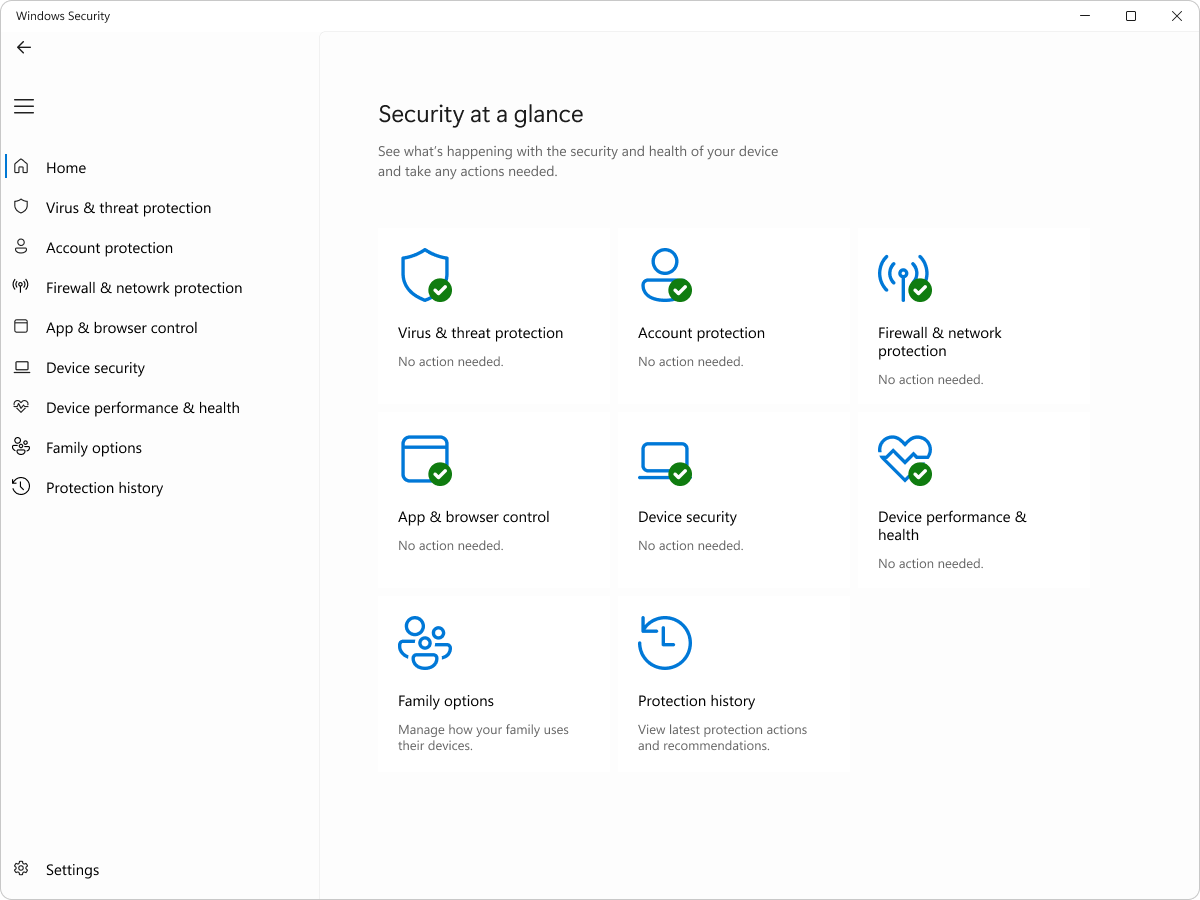
- Use antivirus software. Windows includes Windows Security (formerly Windows Defender), which provides real-time protection against viruses, malware, and other threats at no additional cost.
- Be cautious on public Wi-Fi. Public networks at coffee shops, airports, and hotels are not secure. Avoid logging into sensitive accounts such as bank or healthcare portals on public Wi-Fi. If you must, use a virtual private network (VPN).
- Review app permissions. Check which apps have access to your camera, microphone, location, and contacts. Remove permissions from apps that do not need them. In Windows, go to Settings, then Privacy and Security to review these settings.
Knowledge Check
Part 5: HIPAA and Healthcare Data Protection
If you work in healthcare in the United States, you are required by law to protect patient information. The Health Insurance Portability and Accountability Act (HIPAA) establishes national standards for the protection of sensitive patient health information, known as Protected Health Information (PHI).
What Is Protected Health Information?
PHI includes any individually identifiable health information that is created, received, maintained, or transmitted by a healthcare provider, health plan, or healthcare clearinghouse. According to the U.S. Department of Health and Human Services (HHS), PHI includes the following:
- Patient names, addresses, and dates of birth
- Social Security numbers and medical record numbers
- Diagnoses, treatment plans, and test results
- Insurance information and billing records
- Photographs and biometric data
- Any combination of data that could identify a specific patient
HIPAA Rules for Computer Users
As a healthcare professional using computers daily, HIPAA compliance means following specific practices with every digital interaction:
Lock Your Screen
Press Windows key + L every time you step away from your computer. An unlocked screen in a medical office is a HIPAA violation waiting to happen.
Use Strong Passwords
Never share your login credentials. Each staff member must have their own unique login for audit trail purposes.
Secure Messaging Only
Never send PHI through regular email or text messages. Use your organization's approved secure messaging system.
Minimum Necessary
Access only the patient information you need for your specific job duties. Browsing records out of curiosity is a violation.
Consequences of HIPAA Violations
HIPAA violations carry serious penalties. According to HHS, consequences can range from corrective action plans to significant fines and criminal charges:
- Tier 1 (unaware) -- The person did not know and could not reasonably have known about the violation. Fines range from $100 to $50,000 per incident.
- Tier 2 (reasonable cause) -- The violation was not due to willful neglect but was not corrected. Fines range from $1,000 to $50,000 per incident.
- Tier 3 (willful neglect, corrected) -- The violation resulted from willful neglect but was corrected within 30 days. Fines range from $10,000 to $50,000 per incident.
- Tier 4 (willful neglect, not corrected) -- The violation resulted from willful neglect and was not corrected. Fines start at $50,000 per incident. Criminal charges may apply, with penalties of up to $250,000 and 10 years in prison for the most severe cases.
Healthcare Connection: A medical assistant at a small clinic accesses her neighbor's medical records because she is curious about a recent hospital visit. Even though she does not share the information with anyone, this is a HIPAA violation. The "minimum necessary" standard means you should only access records directly related to your job duties. The medical assistant could face termination, a fine, and a permanent mark on her professional record.
Click the card to flip it
Knowledge Check
Lesson 3.2 Summary
- Digital citizenship means using technology responsibly and ethically. Netiquette is the set of rules for polite, professional online communication.
- Intellectual property and copyright protect original works. Always cite sources, use quotation marks for exact words, and look for Creative Commons licenses when reusing content.
- Phishing, malware, ransomware, and social engineering are common cybersecurity threats. Healthcare organizations are high-value targets due to the sensitivity of medical records.
- Strong passwords are at least 12 characters, use mixed character types, avoid personal information, and are unique for each account. Enable two-factor authentication whenever available.
- Keep software updated, use antivirus protection such as Windows Security, and avoid sensitive transactions on public Wi-Fi.
- HIPAA requires healthcare workers to protect Protected Health Information (PHI). Lock screens, use unique logins, communicate through secure channels, and access only the records necessary for your job.
- HIPAA violations carry penalties ranging from corrective action to fines exceeding $50,000 per incident and potential criminal charges.